Product
AI-native word processor for lawyers.
A desktop app for macOS and Windows. The editor behaves like Word, the AI works on the whole document, and your files stay on your computer.
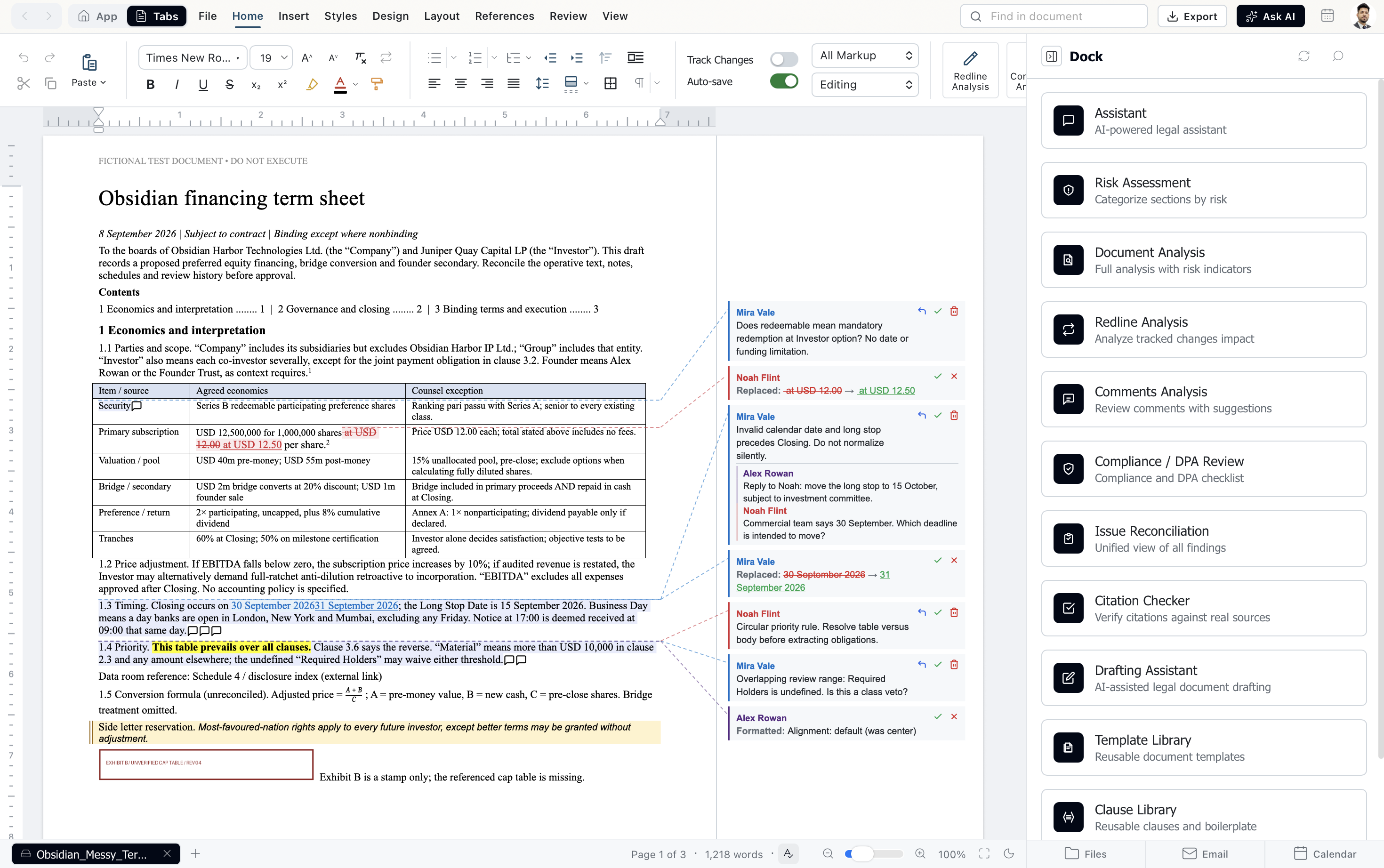
The editor
Your files come back exactly as you sent them.
Open a .docx from opposing counsel, work on it, and send it back. Styles, numbering, tracked changes and comments arrive the way Word expects them.
A real Word file
Every part of the file is kept when you open and save it. There is no import or conversion step.
Word's layout
Pages break where Word breaks them, so the version you send is the version they read.
Word for Windows, on every computer
Commands change the document the way Word for Windows does, on a Mac too. Only the shortcuts follow your system.
Analysis
Five analyses, run on the document in front of you.
Each one starts from the parties and jurisdiction in the document and reads it from your client's side. Results link back to the clause they are about.
Document review
Reads the jurisdiction, statutes, court rules, key sections and parties from any legal document, across 63+ jurisdictions. Every other analysis uses these results, so it reads the document from your client's side.
Risk analysis
Goes through the document section by section and rates each clause High, Moderate, Low or Covered, with protective replacement text for the risky ones. Highlights sit in the document, and reports export to PDF, HTML or Markdown.
Redline analysis
Gives every tracked change a call (accept, reject, negotiate or clarify) and the reason for it. It spots when a deletion and an insertion are one replacement, applies decisions in bulk and builds a summary table of what changed.
Comments analysis
Pulls every comment with its author, date and the text it refers to, then drafts a reply from your party's position. Edit the reply, then insert it under the original comment.
Compliance
Checks the document against the statutes, rules and regulatory requirements that apply to it, across every jurisdiction the document touches.
Every finding in one list
Findings from risk, redline and comments analysis land in one list with duplicates merged. Run it again on the next draft and each issue shows as resolved, new, improved or worsened.
Drafting
Start from a precedent, not a blank page.
Draft with the assistant, then keep what works. Templates and clauses carry {{VARIABLE}} placeholders that are filled in when they go into a document.
Drafting assistant
Pick from 1,300+ document types across 60+ categories, or describe what you need. Names, dates and amounts come back as {{VARIABLE}} placeholders, and you refine the draft by chat.
Template library
Save any selection as a template with its formatting, keep variations for different scenarios, and share them with your team. Export the whole library and import it on another device.
Clause library
Clauses in 23+ categories, from indemnification to governing law. Each one is labelled with its risk level and the party it favours, and goes in at the cursor with your numbering.
Public repository
Templates and clauses shared by other practitioners. Search by category, jurisdiction or document type, check ratings and usage, and import the ones you want into your library.
Tools
The assistant, and the tools around it.
An assistant with a team behind it
A simple question gets one fast answer. A complex one brings in research, drafting, review and citation agents that work in parallel and merge their findings. In edit mode it changes the document and you can undo any step; in ask mode the document stays untouched.
Pipelines
Build workflows on a canvas from 50+ node types: triggers (schedule, email, calendar), AI steps, connectors, conditions and approval gates. For example, an email arrives, AI analyses the attachment, a partner approves, and a summary goes out.
Formatting
Apply legal formatting in one pass: fonts, spacing, margins, heading levels and section numbering in styles like 1.1.1, (a)(1)(i) or Article I. Generate a table of contents and page numbers, and save your settings as a preset.
Enhance
Select text and proofread it, rewrite it, make it formal, concise or clearer, or turn it into a summary, a list or a table. Give your own instruction when none of those fit, and compare the result with the original before you apply it.
MCP connectors
Point the app at any Model Context Protocol server and its tools show up next to ours. The assistant suggests a tool, you approve the call, and credentials stay encrypted on your device.
Work from Claude or Codex
Use inchambers from Claude Code, Cowork, Claude Desktop or Codex. They talk only to the desktop app on your computer, and every edit they make lands as a tracked change.
Set up ClaudeBring your own AI
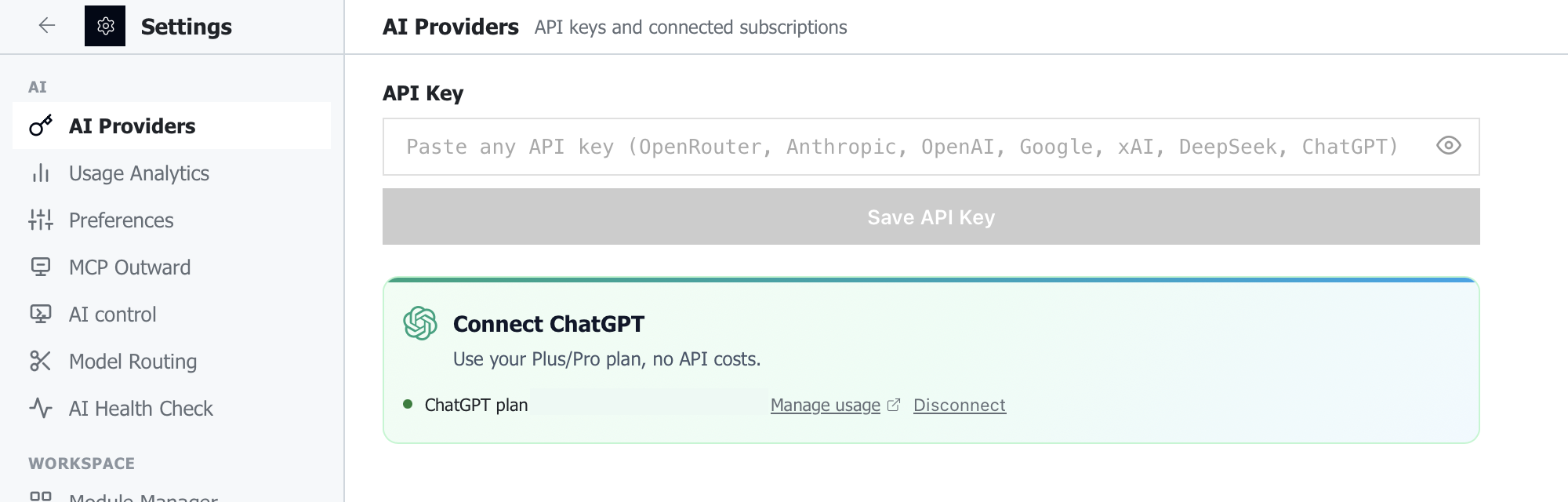
Already pay for ChatGPT? Sign in and start.
Use your ChatGPT Plus or Pro plan, or connect API keys from the providers your firm has approved, several at once. You pay them directly, and we add no markup. A local model can run on your own computer.
Zero-knowledge privacy
We cannot hand over what we never held.
Our servers know who you are and which plan you are on. That is all.
How the architecture worksNo documents. There is no upload endpoint. Files are opened, indexed and edited on your computer.
No prompts or AI responses. Requests go from your computer to the AI provider you chose, and nothing on our side logs them.
No AI keys. Your provider keys and ChatGPT sign-in stay encrypted on your computer.
No training. Your work never trains any model, ours or anyone else's.
Desktop app
One app on your computer, with Word and Outlook beside it.
The desktop app
The editor, the analyses and the assistant run on your computer, at local speed. Legal research, OCR and PDF tools run there too.
The Office add-in
Bring the same tools into Word and Outlook. The add-in pairs with the desktop app on the same computer, so the work still happens there.
Around the document
Outlook and Gmail built in, and documents opened and saved in place on OneDrive and Google Drive.